

SEIYA MUB BY TSUME
ASSEMBLY INSTRUCTIONS

PLEASE DO NOT ASSEMBLE YOUR COLLECTIBLE STATUE IMMEDIATELY AFTER RECEIVING IT.
请勿在收到您的收藏雕像后立即进行组装
Allow the resin to warm to room temperature for at least 24 hours to avoid any risk of breakage.
请让树脂在室温下回温至少24小时,以避免任何破损风险


PREFERABLY WEAR LATEX GLOVES TO HANDLE YOUR STATUE. Two people are required to assemble this statue.
建议佩戴乳胶手套来处理您的雕像
您可以自行组装您的雕像
BOX 1
Floor 1
第一层

BOX 2
Floor 2
第二层

BOX 2
Floor 1
第一层

BOX 1
Floor 2
第二层


Please wait at least 24 hours after receiving your statue to proceed with its assembly.

1. Place the base (34).
放置底座(34

2. Insert the symbol (27) into the base (34).
将徽章(27)插入底座(34)

2b. Insert the symbol (29) into the base (34).
将徽章(29)插入底座(34)

3. Insert the temple (11) into the base (34).
将神殿(11)插入底座(34)

4. Insert the temple (17) into the base (34).
将神殿(17)插入底座(34)

5. Insert the temple (13) into the base (34).
将神殿(13)插入底座(34)

6. Insert the temple (19) into the base (34).
将神殿(19)插入底座(34)

7. Insert the temple (14) into the base (34).
将神殿(14)插入底座(34)

8. Insert the temple (16) into the base (34).
将神殿(16)插入底座(34)

9. Insert the temple (12) into the base (34).
将神殿(12)插入底座(34)

10. Insert the temple (18) into the base (34).
将神殿(18)插入底座(34)

11. Insert the temple (15) into the base (34).
将神殿(15)插入底座(34)

12. Insert the temple (22) into the base (34).
将神殿(22)插入底座(34)

13. Insert the temple (21) into the base (34).
将神殿(12)插入底座(34)

14. Insert the temple (20) into the base (34).
将神殿(20)插入底座(34)

15. Insert the temple (23) into the base (34).
将神殿(23)插入底座(34)

16. Insert the rock (3) into the base (34).
将岩石(3)插入底座(34)

17. Insert the clock (25) into the base (34).
将时钟(25)插入底座(34)

18. Insert the rock (1) into the base (34).
将岩石(1)插入底座(34)

19. Insert the galaxy (43) into the base (34).
将银河(43)插入底座(34)

20. Insert the galaxy (40) into the base (34).
将星系(40)插入底座(34)

21. Insert the rock (30) into the base (34).
将岩石(30)插入底座(34)

22. Insert the galaxy (33) into the base (34).
将银河(33)插入底座(34)

23. Insert the galaxy (36) into the base (34).
将银河(36)插入底座(34)

24. Insert the rock (26) into the base (34).
将岩石(26)插入底座(34)

25. Insert the cloud (42) into the base (34).
将云(42)插入底座(34)

26. Insert the galaxy (31) into the base (34).
将银河(31)插入底座(34)

27. Insert the body (28) into the base (34).
将身体(28)插入底座(34)

28. Insert the galaxy (9) into the base (34).
将银河(9)插入底座(34)

29. Insert the left arm (39) onto the body (28).
将左臂(39)安装到身体(28)

30. Insert the shoulder pad (4) onto the body (28).
将护肩(4)插入身体(28)

31. Insert the effect (32) onto the body (28).
将特效件(32)安装到身体(28)
⚠️ If you wish to display the version with the armor wing, go to step 34.
如果您希望展示带有铠甲翼的版本,请前往第34步

32. Insert the effect (10) onto the body (28).
将特效件(10)安装到身体(28)

33. Insert Pegasus (5) onto the body (28).
将飞马座(5)插入身体(28)
⚠️ If you do not wish to display the version with the armor wing, go to step 38.
如果您不想展示带有铠甲翅膀的版本,请跳至第38步

34. Insert the wing (6) into the body (28).
将翅膀(6)插入身体(28)
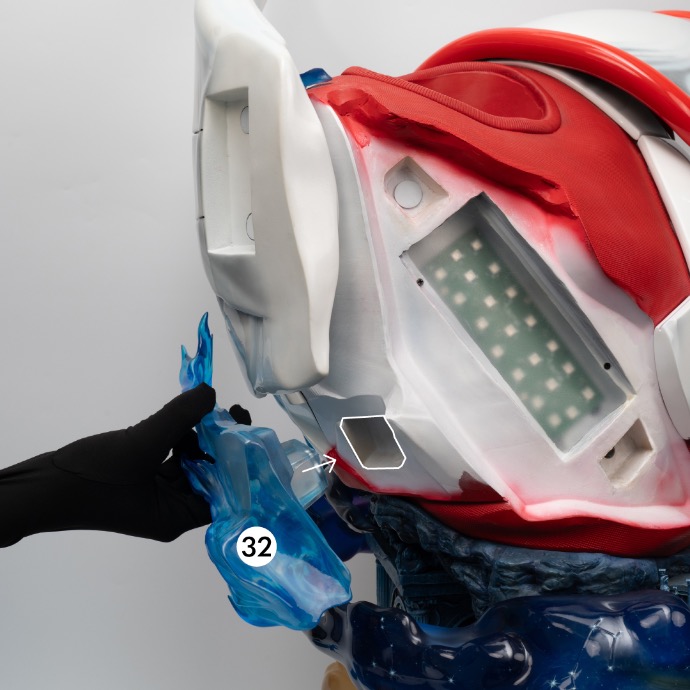
35. Insert the effect (32) onto the body (28).
将特效件(32)安装到身体(28)

36. Insert the effect (8) onto the wing (6).
将特效件(8)安装到翅膀(6)

37. Insert Pegasus (5) onto the body (28).
将飞马(5)安装到身体(28)

38. Insert the temple (24) into the base (34).
将神殿(24)插入底座(34)

39. Insert the head (2) into the body (28).
将头部(2)插入身体(28)

40. Insert the fin (37) into the helmet (2).
将鳍状部件(37)插入头盔(2)

41. Insert the fin (38) into the helmet (2).
将鳍状部件(38)插入头盔(2)

42. Insert the arrow (41) into the wing (6).
将箭矢(41)插入翅膀(6)
⚠️ Only for the version with the armor wing.
仅适用于带有装甲之翼的版本

43. Insert the end (7) into the arrow (41).
将末端件(7)插入箭矢(41)
⚠️ Only for the version with the armor wing.
仅适用于带有装甲之翼的版本

44. Insert the end (7) into the arrow (41).
将箭头尾部(7)插入箭头(41)
⚠️ Only for the MUB version displayed without the armor wing.
仅适用于带有装甲之翼的版本

45. Insert the arrow into the dedicated holder (35).
将箭插入专用支架(35)
⚠️ Only for the MUB version displayed without the armor wing.
仅适用于带有装甲之翼的版本

46. Insert the battery into the remote control. Once the statue is plugged in, you can turn it on and off using the remote control.
将电池装入遥控器。雕像接通电源后,您可以使用遥控器进行开关操作

Enjoy your statue
请尽情欣赏您的雕像
SEIYA MUB BY TSUME
In the event of a problem encountered when opening your statue purchased on the official Tsume-art.com website, please contact our after-sales service team by opening a ticket within 14 days following the date of receipt of the product.
如果在打开您通过 Tsume-art.com 官方网站购买的雕像时遇到问题,请在收到产品之日起14天内通过提交工单联系我们的售后服务团队
Any request made beyond this 14-day period after receipt of the product will not fall within the scope of the guarantee offered, and any returns requested by the customer as well as the transport costs (shipping and return of after-sales service) will be billed to the customer.
在收到产品后超过14天提出的任何请求将不再享受所提供的保修范围,客户所要求的任何可能退货以及相关的运输费用(寄送及售后服务退回)均将由客户自行承担并支付
在收到产品后超过14天提出的任何请求将不再享受所提供的保修范围,客户所要求的任何可能退货以及相关的运输费用(寄送及售后服务退回)均将由客户自行承担并支付